Finding Bad Data in Excel Is Possible. The Setup Is the Problem.
Excel can find duplicates, missing values, and suspicious records—but first you have to build the investigation. See why structured data auditing deserves its own workflow.
Excel is extraordinarily powerful.
You can model finances, analyze thousands of rows, build dashboards, clean datasets, compare records, and automate repetitive work.
So when someone needs to find problems in a spreadsheet, the obvious response is:
Why not just use Excel?
And technically, you can.
The problem is not whether Excel can find bad data.
The problem is everything you have to build before, during, and after you find it.
When a CRM export, financial report, inventory file, or operational CSV lands in your inbox, you usually do not know where the problems are yet.
That is the moment data auditing stops being a spreadsheet task and becomes an investigation.
Imagine receiving a CRM export
Suppose you receive a file with 50,000 customer records.
You need to know:
- Which records are duplicates?
- Which important fields are missing?
- Which email addresses look invalid?
- Which records contradict one another?
- Which values have suspicious formatting?
- Which entries need a human to investigate?
- Which problems have already been reviewed?
- Which issues were resolved, ignored, or intentionally accepted?
None of those questions are impossible to answer in Excel.
But Excel does not automatically know that these are the questions you are trying to answer.
You have to build the investigation from scratch.
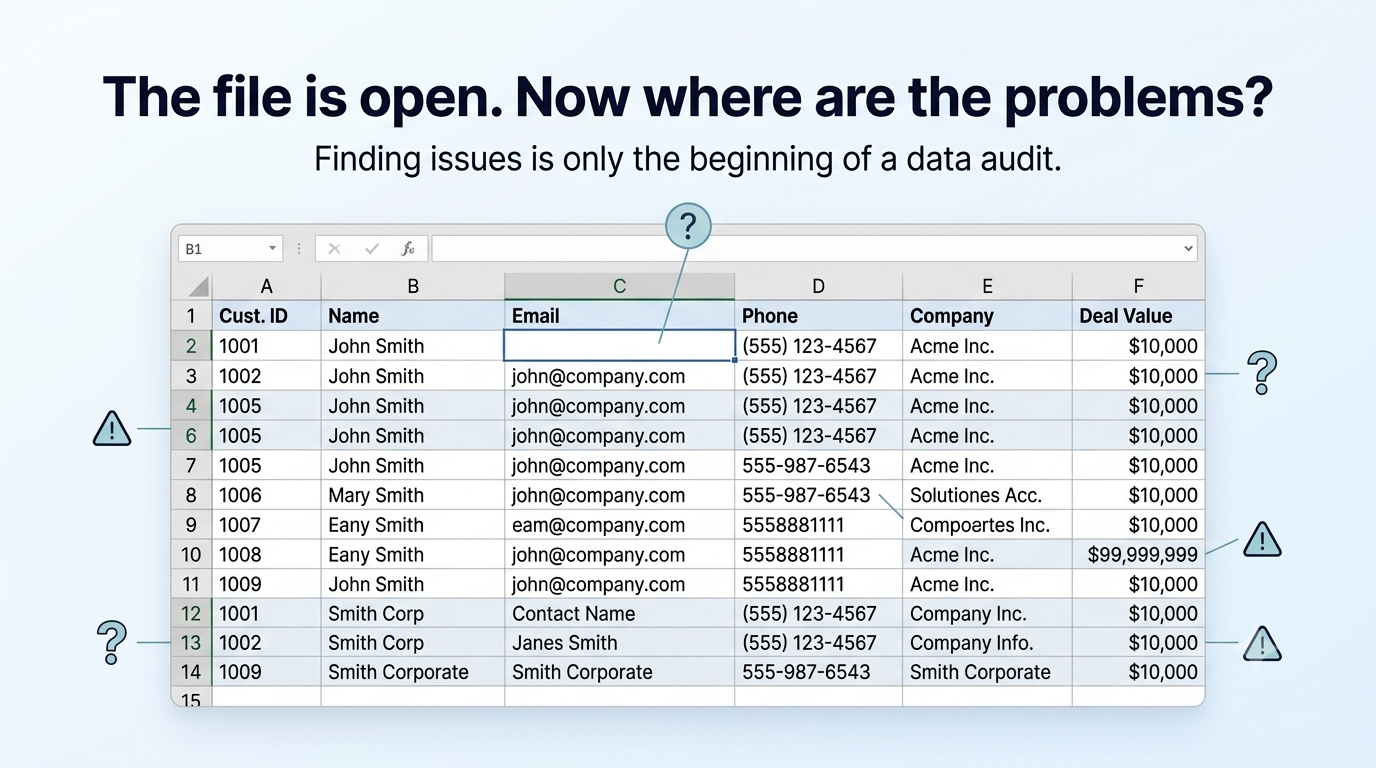
The file is open. The problems are in there somewhere. Finding them is only the beginning.
Step 1: Flag missing information
Say column C holds customer email addresses.
A common Excel check looks like this:
=IF(C2="","Missing email","")
Copy it down the column and you get a helper flag for blank emails.
That part is simple.
The harder part is deciding what counts as missing in your workflow, whether blanks are acceptable on some rows, and how you review flagged records without losing context as the file grows.
Step 2: Flag possible duplicates
Next you might add a duplicate check on customer ID:
=COUNTIF($A:$A,A2)>1
Filter for TRUE and inspect the candidates.
Again — the formula itself is straightforward.
Duplicates are rarely purely mechanical. Two rows may share a phone number for legitimate reasons. Two similar names may be different people. A repeated external ID may be the real issue — or it may reflect a parent/child account pattern your team already understands.
Excel can highlight candidates. It cannot tell you which ones matter.
Step 3: Keep adding checks
If you keep going, the sheet accumulates more logic:
- invalid email patterns
- inconsistent phone formatting
- negative or impossible quantities
- dates that do not parse cleanly
- values that conflict across columns
- outliers that deserve a second look
Each new concern means another helper column, another filter, another rule, another note.
The file is still one file. The investigation is spreading across it.
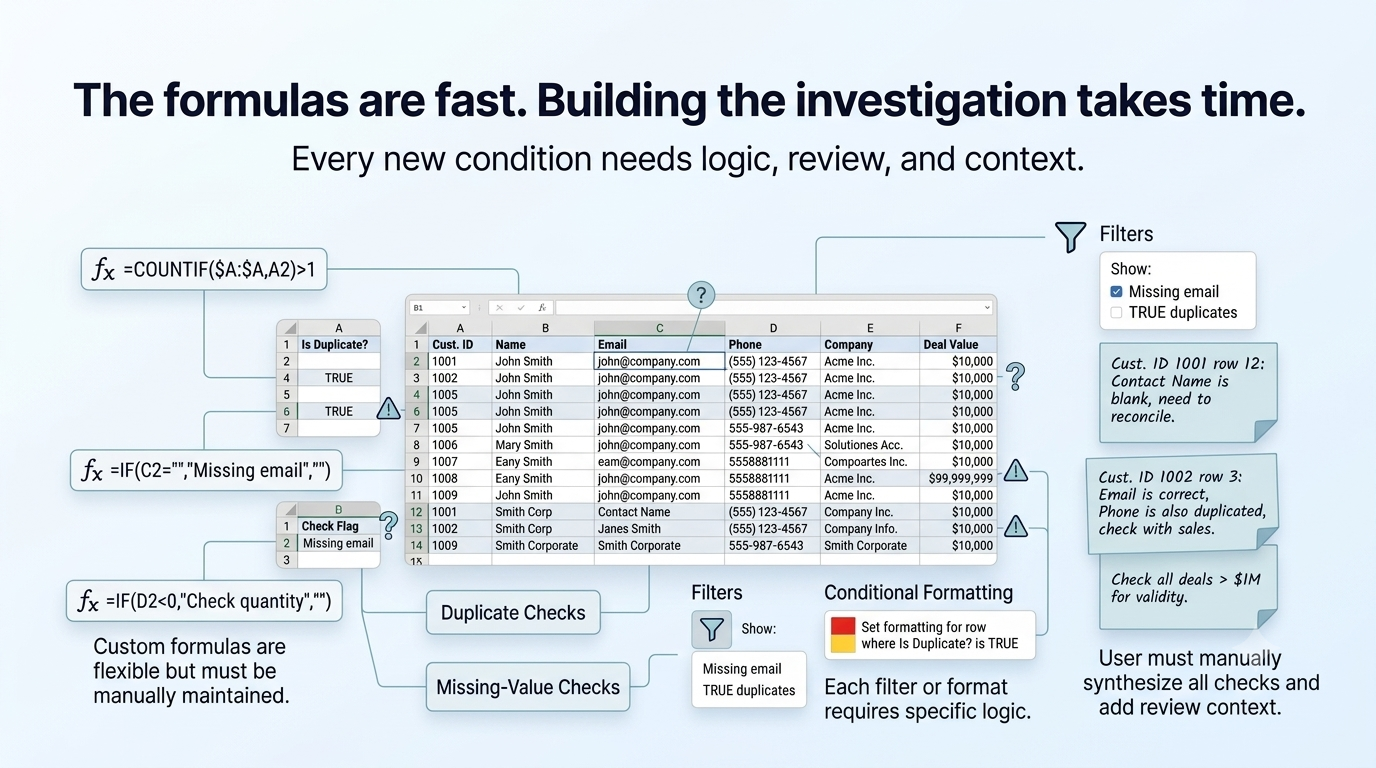
The formulas can be fast. Building the investigation takes time. Every new condition needs logic, review, and context.
Step 4: Make the problems visible
Once the checks exist, you still need to make them usable.
That usually means:
- filters for each issue type
- conditional formatting so problems stand out
- sorted views so reviewers can work row by row
- color codes that made sense on day one and confuse someone else on day four
- comments, sticky notes, or side columns explaining what was already reviewed
Spreadsheet auditing starts to feel less like analysis and more like building a temporary internal tool inside a temporary internal tool.
Every new question adds setup.
Every new reviewer adds interpretation.
Every new export can break the assumptions baked into last week's formulas.
Step 5: Decide what to do with each issue
Finding a problem is not the same as resolving it.
A missing email may be acceptable for a legacy account.
A duplicate may be intentional.
A suspicious value may be valid in that company's workflow.
A formatting issue may be cosmetic.
A conflict may require a conversation with sales, finance, or operations before anyone changes a cell.
So the real work is not only detection. It is review.
Someone has to decide:
- Is this actually a problem?
- How serious is it?
- Should it be fixed now?
- Should it be accepted?
- Should it be ignored for this import?
- Has anyone already looked at it?
Excel can store the original data and the flags you created.
It was not designed to carry the full lifecycle of an investigation.
The hidden cost is not the formula. It is the workflow.
Individual formulas are often simple.
The cost shows up in the assembly:
- building the checks
- maintaining them when the file changes
- re-running the review when a new export arrives
- remembering which rows were already accepted
- explaining to a teammate why one issue was resolved and another was not
- preparing the file for import without breaking the helper columns you depended on
That is why teams end up with colorful spreadsheets, side notes, filtered views, and inbox threads that all describe the same investigation in different places.
The audit lives in the setup around the file — not just in the cells.
What a data audit actually needs
Before operational data moves into a CRM, finance process, inventory workflow, or reporting system, teams need more than flags in columns.
They need a structured way to:
- surface missing values, duplicates, conflicts, and suspicious records
- navigate from issue to issue without losing place
- review each case with context
- record a decision
- keep history when the file changes
- know what is safer now than before
That is not a criticism of Excel. Excel is excellent at many things.
But once spreadsheet review becomes an investigation — with judgment, ownership, and consequences — the work deserves its own layer.
Turn checking into an investigation workflow
That is the gap Auditere is built around.
Not replacing Excel for every task.
Not pretending every suspicious value should be auto-corrected.
A workspace for structured review before data is trusted downstream:
- ingest structured operational data
- surface duplicates, missing values, conflicts, and suspicious records
- investigate issue by issue with context
- resolve, accept, or mark follow-up where human judgment matters
- retain history so review decisions do not disappear when the file moves on
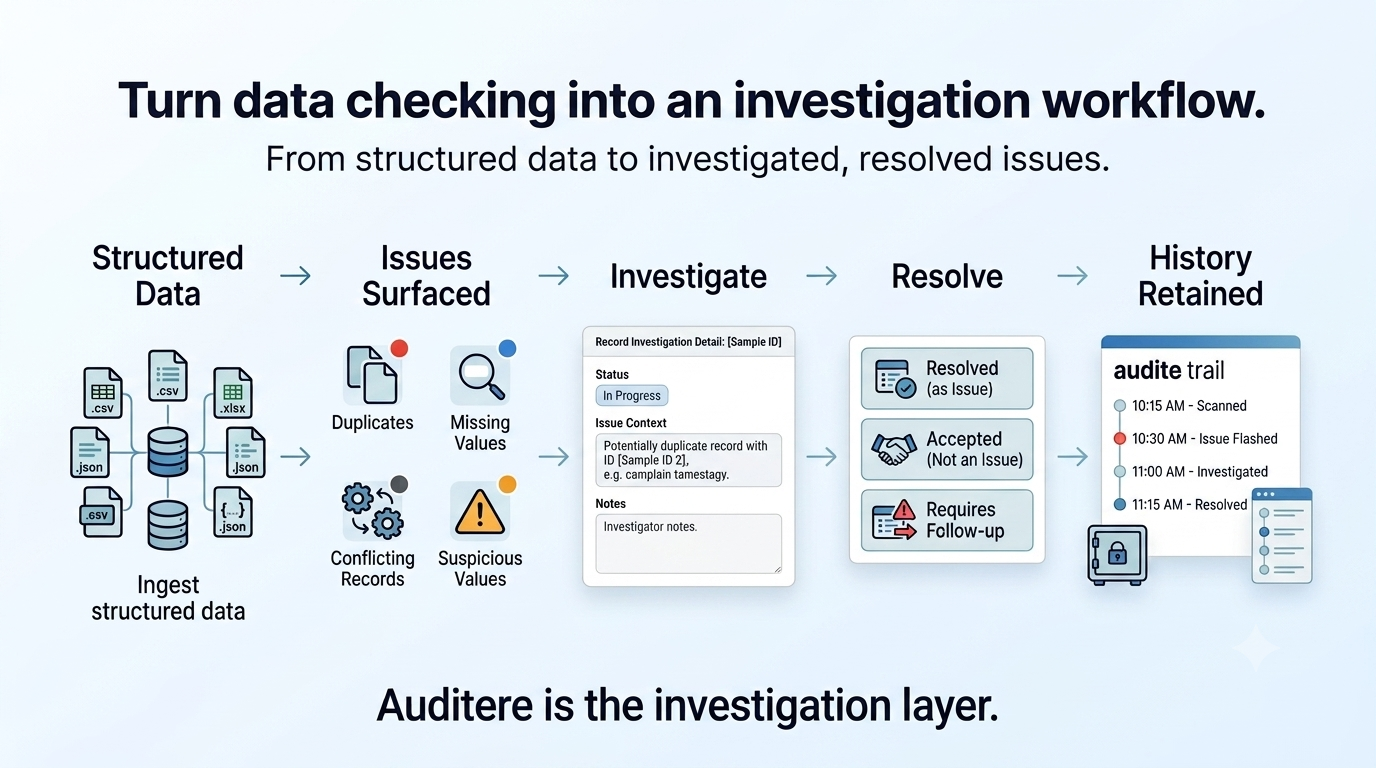
Excel can find bad data. The setup is the problem.
If your team already lives in spreadsheets, you do not need another lecture about whether Excel is powerful enough.
You already know it is.
The question is whether your process makes investigation clear, repeatable, and safe before the file becomes someone else's source of truth.
That is the problem Auditere is focused on.
Related reads: Your spreadsheet can be wrong without showing a single error · 3 data-cleaning questions with no universal answer · Audit before you import · Small spreadsheets can still break your business
Auditere is live for beta. Start your free trial or view pricing.